
Instant subtitles
Advanced AI speech recognition delivers accurate transcriptions and translations with near-zero latency.
Meeting Assistant is its own workspace for Google Meet and Microsoft Teams. Follow translated subtitles, speaker-attributed transcripts, and executive minutes without running the meeting inside the Transpera dashboard.
Opens in the Chrome extension for Google Meet and Microsoft Teams. The dashboard does not capture meeting audio.
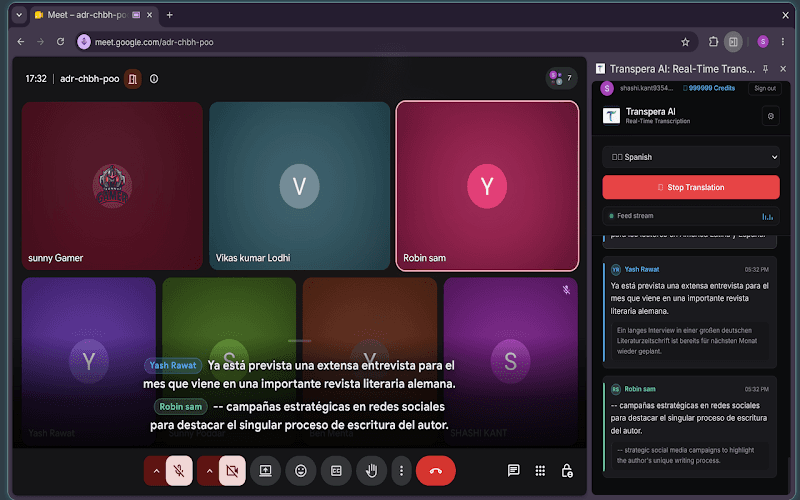
Advanced AI speech recognition delivers accurate transcriptions and translations with near-zero latency.
No clunky software to download. Open the side panel, click start, and let the AI handle the rest.
Smart silent audio capture hears both you and meeting participants without echo or feedback.
Use the dedicated workspace alongside Google Meet and Microsoft Teams. Minutes and transcripts stay with Meeting Assistant, not the Transpera dashboard.
Live translation
Translated subtitles, speaker-attributed transcripts, and executive minutes live in Meeting Assistant for Google Meet and Microsoft Teams.
From install to live subtitles in under a minute.
Click the Transpera AI icon in Chrome to open the extension side panel.
Log in to authenticate your session and connect your Transpera account.
Start your meeting and watch real-time translated subtitles appear as people speak.
We capture audio locally and process it securely solely to generate live translations. We do not store your meeting audio.
What teams ask before rolling out live meeting translation.
It is a Chrome extension that provides real-time transcription and translation subtitles for web meetings directly inside your browser.
The extension uses smart silent audio capture to hear both your microphone and meeting participants clearly, without echo or audio feedback.
Install the Transpera AI Chrome extension and bring real-time translated subtitles to your next web meeting.